Posts

Showing posts with the label file system

Install LAMP (Linus Apache My SQL PHP ) in LINUX / UBUNTU TIPS

Image
This is how wiki defines LAMP ...                      LAMP is an acronym for a solution stack of free , open source software, referring to the first letters of Linux ( operating system ), Apache HTTP Server , MySQL ( database software ) and originally Perl (but now sometimes PHP or Python ), principal components to build a viable general purpose web server . 1. At first  Login as root: sudo su 2 Install MySQL 5 apt-get install mysql-server mysql-client 3.  Install Apache apt-get install apache2 Now type "localhost" in web page ad you will lead to apache page Default location is /var/www   - web-root by default 4.  Install PHP5 apt-get install php5 libapache2-mod-php5 Now restart PHP /etc/init.d/apache2 restart 6.  To get support of My Sgl in php apt-cache search php5 Also install the following bundles... ap...

Make aDVD/CD Bootable at the Easiest

Image
Here i will tell you how to make a CD/DVD bootable.Here i consider the process with the CDBurnerXp software which is free.You can download it From here: Download Following are the steps:- 1.Start the CD burner 2.Go to Data Disc 3.From menu :Disc->boot options 4.Give the ISO file location and accept the preference default in it 5.Done 6.If you don't have the ISO file then you can create as follows 7.Select the files that we want to write 8.Then go to : File->create ISO image 9.Its Done

Windows optimiser for more speed.....

Image
We can increase the speed of the windows to a some what limit using this free software called error fix.U can visit it from their website Visit: errorfix

Remove shortcut arrow from desktop icons in any type of document

Image
a) Perform instructions described under ‘Remove shortcut arrow from desktop icons’. For your convenience, steps 1 to 3 are reported here. b) Perform instructions described under ‘Remove shortcut arrow from desktop icons (2)’. For your convenience, steps 4 and 5 are reported here. c) And finally, do the same with conferencelink, docshortcut, internetshortcut and wshfile. So, here is a summary of all actions: 1. Start regedit. 2. Navigate to HKEY_CLASSES_ROOT\lnkfile 3. Delete the IsShortcut registry value. 4. Navigate to HKEY_CLASSES_ROOT\piffile 5. Delete the IsShortcut registry value. 6. Navigate to HKEY_CLASSES_ROOT\ConferenceLink 7. Delete the IsShortcut registry value. 8. Navigate to HKEY_CLASSES_ROOT\DocShortCut 9. Delete the IsShortcut registry value. 10.Navigate to HKEY_CLASSES_ROOT\InternetShortcut 11. Delete the IsShortcut registry value. 12. Navigate to HKEY_CLASSES_ROOT\WSHFile 13. Delete the IsShortcut registry value. 14. Close regedit. lets hav a neat desktop.................

How to Disable drives in My Computer from unknown user.

If you want to prevent any users to access your computer or network shared drives using My Computer then you can hide the all drives for example C:/, D:/ and save your data from any unknown user. But next time you can turn on the display of these drives using registry editor. Now edit the computer registry to turn off the display of drives, but be careful to work with computer registry. Follow the given steps to hide computer drives: First click on Start button then type Regedit in Run option. Here locate the location to: HKey_Current_User \ Software \ Microsoft \ Windows \ Current Version \ Policies \ Explorer Here right click on right side of Registry editor panel and add new DWORD then put its value 3FFFFFF. Now close the registry editor and restart your computer after any changes to go into effect.

disabling "turn off " in start menu

Image
Lets hav a fun..a magic in windows.... Follow the given steps to disable Turn off Computer" button on the start menu: To use this feature, you will need to be logged into your computer with administrative rights. Click Start button and type regedit in Run option then press Enter for next. Here locate the location to: HKEY_CURRENT_USER\Software\Microsoft\Windows\CurrentVersion\Policies\Explorer Here in right side panel, right click to create a new DWORD value with the name NoClose. Now assign number 1 in value data box and close the registry editor. Now close the registry editor and restart your computer after any changes to go into effect. But next time, if you want to enable "Turn Off Computer" button on start menu then simply change the value of data box to 0 or delete NoClose DWORD item.

How to change the default Location Of programs in windows

Image
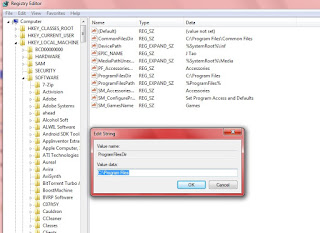
First click on Start button then type Regedit in Run option. Here locate the location to: Go to HKEY_LOCAL_MACHINE\SOFTWARE\Microsoft\Windows\CurrentVersion Here in right side panel, double click on ProgramFileDir and here its default value is C:\Program Files. Change it to any other directory as u want... and its done

Knowing the Linux permissions

Image
Three types of permission read write and execute, Ever file and folder have three relations owner group and others [ Read = r write = w execute = x ] [ owner = u group = g other = o ] [root@pc1 ~] # Ls -Ld /disk 1= nature of object [d=dir -=file L=link] 2= first three permission for owner [ rwx ] 3= second three permission for group members [ r-x] 4= third three permission for others [r-x] 5= number of inodes contain by this directory 6= owner of directory 7= group of directory 8= size of directory 9= creating date of object 10= name of object

Linux file system

Overview of the Linux file system /bin All commands which are used by normal users /etc System conf files /var Server data logs Mail proxy cache /dev All devices name stored in /dev /sbin All commands which are used by supper user /boot Linux kernel ( vmlinuz , initrd ) Grub directory /usr All gui tools installed in /usr /proc System information’s ( picture of RAM ) /home User's home dir's /tmp Temporary files /media Auto mounted devices mount point in /media

Burn a data CD or data DVD in Windows 7 using Media Playe

You can burn a data CD or data DVD in Windows 7 using Media Player as follows: $ Click Start. $ Click All Programs. $ Select Windows Media Player. $ Click the Burn tab in the Player Library. $ Click Burn options and select Data DVD or CD. $ Insert a blank disc into the CD or DVD burner of your computer. $ Close the AutoPlay dialog box if it comes into sight. $ Some people have more than one CD drive in their computer. If you have multiple CD drives in your computer too, select the one you would like to use in the navigation window. $ Look for the songs you want to burn. $ In order to make your burn list, drag the songs from the details pane in the center of the Player Library to the list pane which is on its right side. $ You can also change the order of the items in the burn list by dragging them upward or downward in the list. $ To remove a song from your ...

How to access new cool themes in windows 7

Image
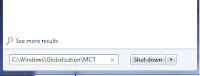
step 1:U want to type C:\Windows\Globalization\MCT in the search box of the Start menu. step 2:open any folder and select any theme files in the folder .. yahooooooooo ........... new theme is up... enjoy....

"Delete conformation box"-remove it...(in win 7)

Image
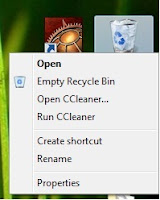
u can disable the delete conformation box in win 7and it sver easy .. dont do it until its necessary,other wise it can end in disaster... there r mainly 2 steps; step 1: right click the recycle bin and select properties step 2: uncheck the "delete conformation box" and its done... check it out and its cool for a pro.